




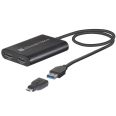

Sonnet DisplayLink Dual HDMI Adapter For M1 Macs
Connects Two 4K Displays to Macs or PCs
MPN: SON-USB3-DHDMI SKU: SON-USB3-DHDMI

Apple M1 Mac computers offer outstanding overall performance but have a limit to the number of external displays you can connect to them. If you’re using an M1 MacBook Air or MacBook Pro, that number is one. Featuring DisplayLink technology, Sonnet’s DisplayLink Dual HDMI Adapter for M1 Macs beats the limit, enabling you to connect two 4K (3840 x 2160) @ 60Hz HDMI displays to a single port on your computer.

Ask our team about our Price Match Pledge.
Get in touch
In stock
Usually Ships in 1-2 Days
Two HDMI Displays From A Single USB Or Thunderbolt Port
Apple M1 Mac computers offer outstanding overall performance but have a limit to the number of external displays you can connect to them. If you’re using an M1 MacBook Air or MacBook Pro, that number is one. Featuring DisplayLink technology, Sonnet’s DisplayLink Dual HDMI Adapter for M1 Macs beats the limit, enabling you to connect two 4K (3840 x 2160) @ 60Hz HDMI displays to a single port on your computer.
Expand Your Applications Workspace
Perfect for use with productivity software such as Microsoft Office, this Sonnet adapter enables you to work more efficiently by expanding your workspace. Whether you need to open multiple applications on their own screens, edit code or view a spreadsheet in detail on a large display, or mirror your notebook’s display on a larger monitor, the Sonnet DisplayLink Dual HDMI Adapter for M1 Macs makes it possible.
Browse The Web. Watch Videos.
Even when you’re not using productivity software, your notebook’s screen can constrain your view. Go big—the Sonnet DisplayLink Dual HDMI Adapter for M1 Macs enables you to connect your computer to your large monitor or big screen TV to browse the web and watch videos on YouTube and other content at a distance.
Connect Four Displays To Your M1 Mac Mini
Simple To Set Up and Use
Just download and install the DisplayLink Manager software, connect two displays to the Sonnet adapter, and plug the adapter into your computer. Connect the third display to the Mac mini's built-in HDMI port and the fourth display to a Thunderbolt port. Finally, configure settings to extend your desktop on the connected displays. And because your computer powers the Sonnet adapter, there’s no need to connect an additional power supply.
Supports Full HD (1080P) Displays And Audio Out
While the Sonnet DisplayLink Dual HDMI Adapter for M1 Macs supports two monitors at up to 4K resolutions (3840 x 2160), you can also use it to connect monitors with lower resolutions, like full HD 1080p (1920 x1080) @ 60Hz—this makes it great for use for different home and work applications. Because audio support is built into the Sonnet adapter, you don’t have to plug in a separate cable to hear sound from connected displays.
Compatible With All Macs (MacOS 10.15+) And Windows 11 or 10 Computers
Sonnet's DisplayLink Dual HDMI Adapter is ideal for M1 Macs, and Intel-based Mac or Windows computers with USB 3 or USB-C interfaces. Although the adapter is compatible with all Macs running macOS 10.15+, and all PCs running Windows 11 or 10, we recommends Sonnet's Thunderbolt Dual HDMI Adapter for Mac or Windows computers with Thunderbolt 4 or 3 interfaces.
- Connects Two 4K Displays to Macs or PCs
Enables connection of two 4K HDMI displays to a single Thunderbolt or USB port on your computer - Connect to a Thunderbolt or USB Port
Includes a USB-A female to USB-C male adapter - Expands Your Onscreen Work and Play Area
Open multiple applications on different displays, view your work on larger screens, browse the web, and watch videos. - Easy Setup. Bus Powered.
Just download/install DisplayLink Manager software, connect the bus-powered adapter and displays, and then configure your desktop on the connected displays - Use with Thunderbolt Hubs
Connects to an open port on a Thunderbolt hub connected to your computer - Supports Other Resolutions
Also supports 1080P and other lower resolution displays at 60Hz - Supports Audio
Passes audio through the cable connecting your display - Perfect for M1 Mac Notebooks
Best for use with M1 MacBook Air and M1 MacBook Pro - Mac and Windows Compatible
Also compatible with other Mac and Windows computers
Compatibility
- Mac Compatibility:
- Macs support two 4K monitors with one adapter
- Macs support four 4K monitors with two adapters
- macOS® 10.15+
- macOS Montery compatible
- Display Rotation Support:
- M1, M1 Pro, and M1 Max Macs require macOS 12+
- Intel Macs require macOS 11+
- Closed Clamshell Support:
- M1, M1 Pro, and M1 Max Macs compatible all versions of supported macOS
- Intel Macs require macOS 12+
- Windows Compatibility:
- Windows computers support two 4K monitors with one adapter
- Windows computers support four 4K monitors with two adapters
- Windows 10 or 11
- Ubuntu Compatibility: Ubuntu 20.04
- Application Compatibility:
- Suitable for productivity applications and videos
- Not recommended for gaming or applications that require a dedicated GPU
Hardware
- Warranty: 2-year
- Form Factor: Display adapter
- Bus Interface: USB 3.2 Gen 1
- External Connectors:
- Two HDMI
- USB 3 captive cable
- Chipset: DisplayLink DL6950
- Standard: HDMI 2.0
- Supported Resolutions: Up to 3840 x 2160 @ 60 Hz(2)
- Dimensions (WxDxH): 2.4 x 3.1 x 0.6 in. (60 x 80 x 15 mm)
- Compliance:
- RoHS 3 (Directive 2015/863)
- IEC62368-1 and IEC62368-2 Safety
- DisplayLink Dual HDMI Adapter for M1 Macs (with captive 0.34-meter USB-A cable)
- USB-C male to USB-A female adapter
- Documentation
 Expertise
Our team of audio experts are here to help you find the right solution for your studio.
Get in touch ESV Insight

AUTHORISED DEALER
Genuine products with full
warranty and support
EXPERT ADVICE
Speak to real people
who know their gear.
FAMILY-RUN
A personal friendly service
you can rely upon.
TRUSTED
Studios, broadcasters and
creators across the UK.
FAST & FREE
Free UK delivery
on orders over £249